Players – Assign league and non-league players to the current tournament, with search and filtering.
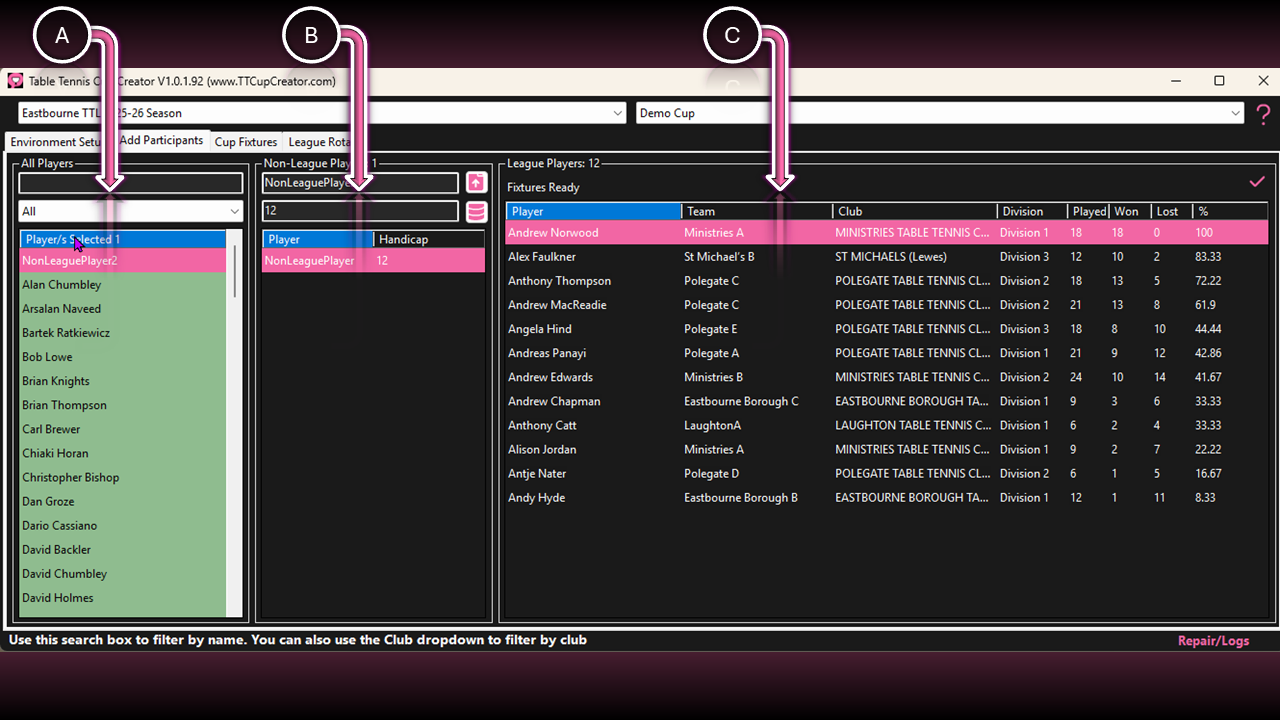
A. Player List
| Function | Interaction | Description |
|---|---|---|
| Player Search | Input Field | Search for players by name. |
| Club | Selector | Filter players by club. |
| Add to Tournament | Right Click Row/s | Add selected player/s to the current tournament. |
| Add to League Rota | Right Click Row/s | Add selected player/s to the League Rota. |
| Delete Non-League Member | Right Click Row/s | Delete non-league player/s from the system. To delete league members, remove the division instead. |
B. Non-League Participants
Note: Players added here will appear in the Player List but must still be added to the tournament.
| Function | Interaction | Description |
|---|---|---|
| Player Name | Input Field | Enter player name. |
| Import Players | Button |
Import players from a spreadsheet. ⚠️ Columns: Name | Final Handicap | Rank (optional) |
| Final Handicap | Input Field |
Enter final handicap. ⚠️ No calculation required. |
| Save Player | Button | Save the player to the database. |
| Remove from Tournament | Right Click Row/s | Remove selected player/s from the tournament. |
C. League Participants
| Function | Interaction | Description |
|---|---|---|
| Remove from Tournament | Right Click Row/s | Remove selected player/s from the tournament. |