Fixtures – Generate, view and export fixtures, add additional matches, and manage fixture history.
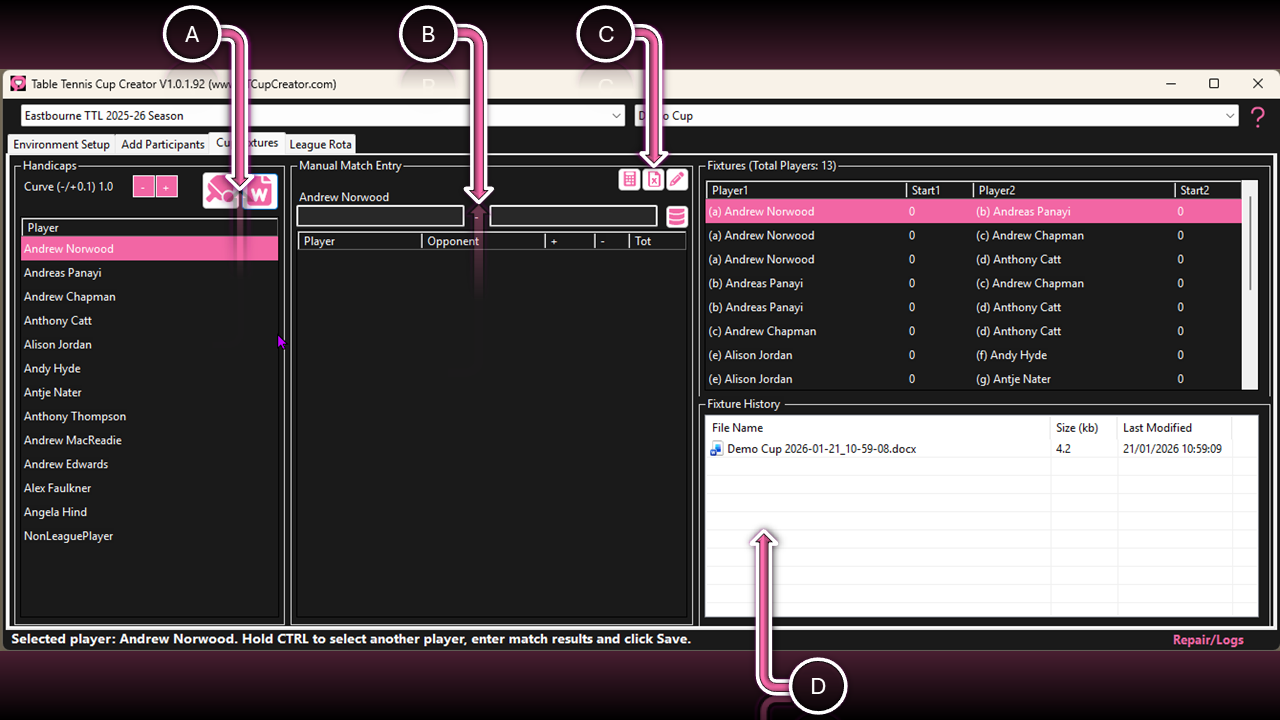
A. Fixtures
| Function | Interaction | Description |
|---|---|---|
| Handicap Curve | Buttons (+/−) | Fine-tune the handicap curve (default 1.0, range 0.1–2.0). Click Generate Fixture to apply changes. |
| Generate Fixture | Button | Calculate handicaps and create fixtures. |
| Generate Document | Button | Export fixtures to a document (.DOCX). Change export selections in the Preparation tab. |
B. Single Match Entry
| Function | Interaction | Description |
|---|---|---|
| Left & Right | Input Fields | Hold CTRL, select two players from the list, then enter the points scored (e.g. 26–50). |
| Store Matches | Button | Click Database to store entered results. |
| Match List | Right Click | Remove a match from the list. Both Player A→B and B→A entries are deleted. |
C. Multiple Match Entry
| Function | Interaction | Description |
|---|---|---|
| Handicap Spreadsheet | Left Button | Export calculated handicaps to a spreadsheet (ratio to the weakest). Generate fixtures first. |
| Matches Spreadsheet | Middle Button | Export the match matrix spreadsheet (non-league). Use formulas (e.g. =32/50). No need to edit grey cells. |
| Import Matches | Right Button | Import added or amended matches from the spreadsheet. Save and close the file first. |
D. Document Archive
| Function | Interaction | Description |
|---|---|---|
| Open Document | Double Click | Open the selected document in Word or LibreOffice. |
| Delete Document | Right Click | Delete unwanted documents. Hold Shift/CTRL to select multiple documents. |