League Rota – Schedule league nights and generate a balanced team rota.
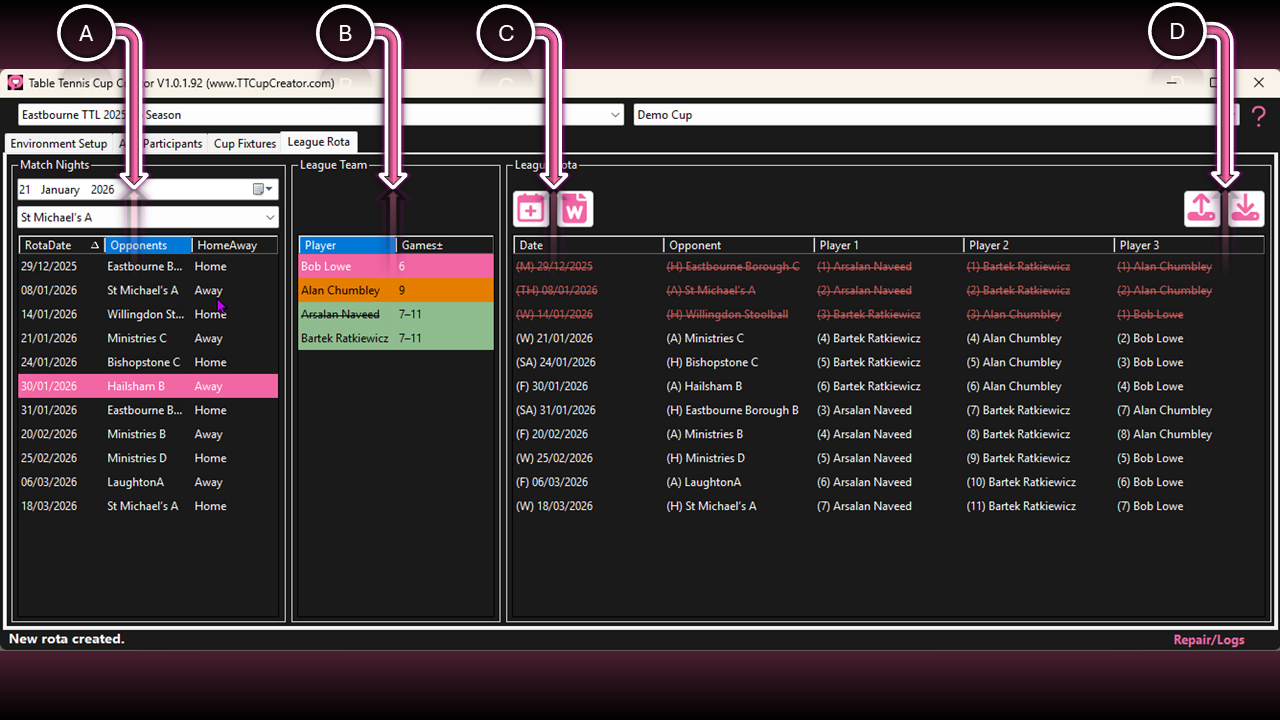
A. Matches
| Function | Interaction | Description |
|---|---|---|
| Date | Selector | Select the match date. |
| Opponent | Selector |
Select the opponent. ⚠️ Opponents are only shown from imported divisions. |
| Home/Away | Right-click row/s | Set whether the match is Home or Away. |
| Remove | Right-click row/s | Remove selected match(es). |
B. Team
| Function | Interaction | Description |
|---|---|---|
| Unavailable on Date/s | Right-click player/s | Select date(s), then right-click player(s) and choose Unavailable. Unavailable players are excluded on those dates. |
| Play Frequency | Right-click player/s |
Choose how often a player participates:
⚠️ Estimated games are shown. |
| Remove | Right-click player/s | Remove player(s) from the rota. |
C. Rota
| Function | Interaction | Description |
|---|---|---|
| Create Rota | Button |
Generate a rota based on selected dates, availability and play frequency. ⚠️ Click again to recalculate and regenerate the rota. |
| Document | Button |
Export the rota. ⚠️ Upcoming games are highlighted in green; past dates in red. |
| Players | Drag | Drag a player to another slot (only valid moves are allowed). |
| Opponents | Drag | Drag opponents to different dates. |
D. Storage
| Function | Interaction | Description |
|---|---|---|
| Save Current Rota | Button | Store the current rota. |
| Load Saved Rota | Button | Load a saved rota for viewing or amendments. |