TT Cup Creator is a Windows-based tool for organising table tennis tournaments. Designed to import and manage players, then automate fixtures — all in one simple workflow.
System Requirements
The software detects if requirements are installed. No Microsoft Office subscription required - LibreOffice supported.
| Component | Required | Notes |
|---|---|---|
| .NET Desktop Runtime 10.0+ | Yes | Provides core libraries required to run. |
| Microsoft Access Runtime (64-bit) | Yes, if Microsoft Access is NOT installed | Enables database access without a full Office licence. Install the English (EN) version. |
| Microsoft Access (64-bit, Full Version) | No | Used for database integration. If installed, the Access Runtime is not required. |
| LibreOffice or Microsoft Word | Yes (for exports) | For viewing or editing exported XLSX and DOCX files. LibreOffice supported. |
GUI Overview
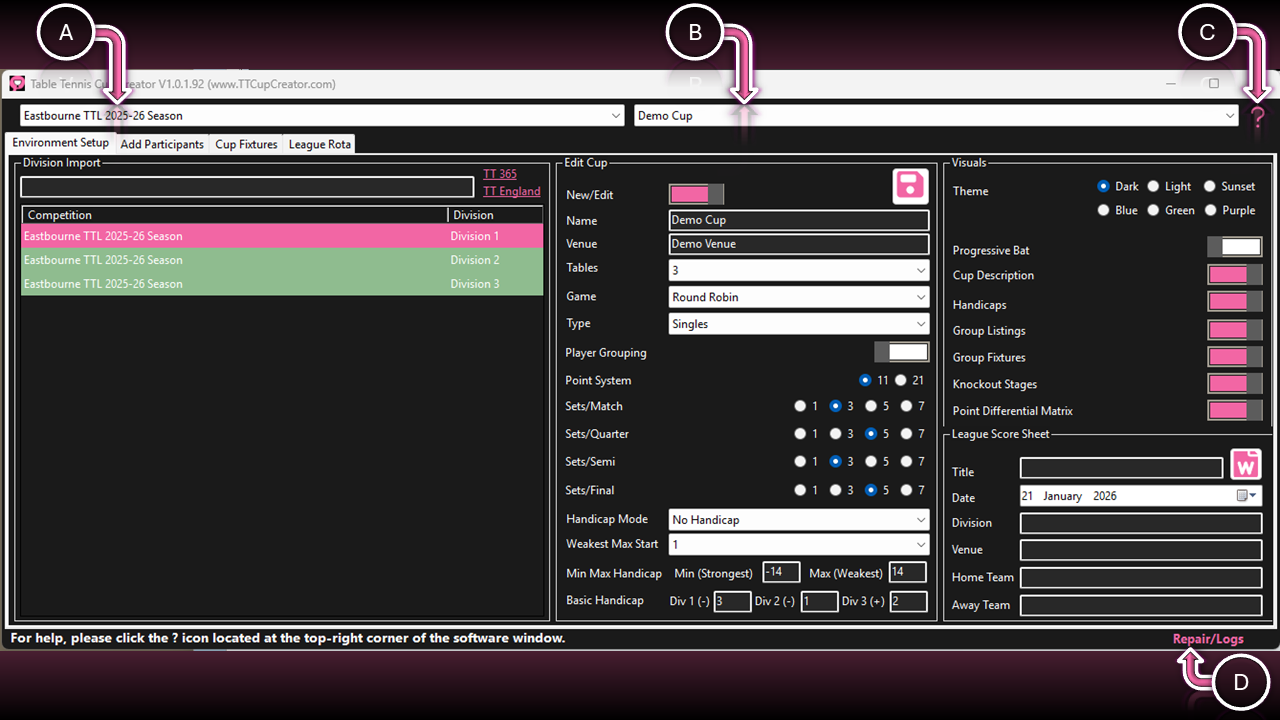
A & B. Selectors
| Function | Interaction | Description |
|---|---|---|
| Competition (A) | Selector | Select imported competition to show its imported values. |
| Tournament (B) | Selector | Select the tournament you want to amend/export. |
C. User Guide
| Function | Interaction | Description |
|---|---|---|
| Question Mark | Left Click | Opens this user guide directly from the software. |
D. Software Repair
| Function | Interaction | Description |
|---|---|---|
| Repair/Logs | Left Click |
Yes — Reset the software to its default state
(use if the software is not functioning correctly). ⚠️ This action will erase all data in the database. No — View the log file. |